Editeur SQL
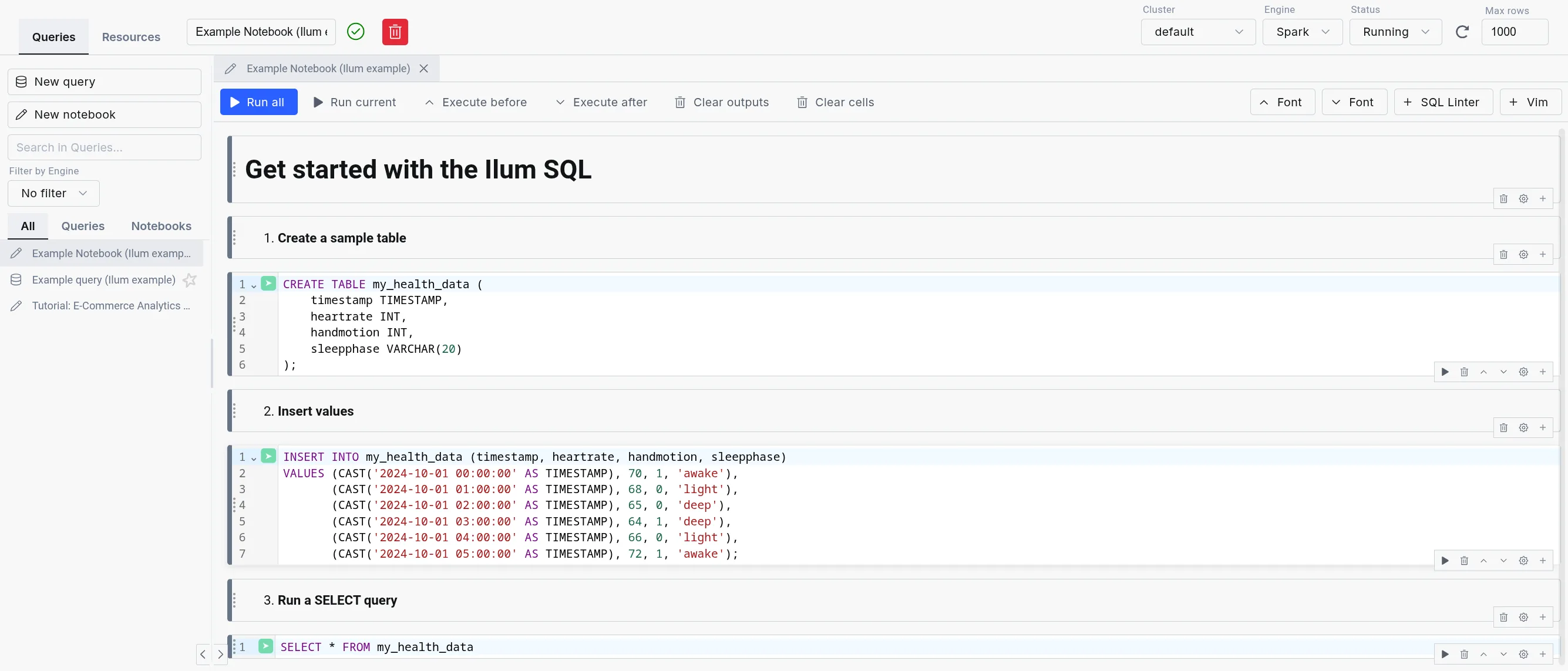
The Ilum Editeur SQL (formerly Editeur SQL) is the in-product workbench for running SQL across every engine Ilum supports: Apache Spark, Trinitaire, DuckDBet Apache Flink. Queries execute through the Apache Kyuubi SQL gateway, with DuckDB integrated as an in-process engine for the lowest possible latency.
Designed for simplicity, the SQL Editor offers an intuitive interface for running queries, exploring data, and gaining insights quickly without writing Scala or Python code.
It is highly configurable through the UI or Helm deployment values, allowing flexibility in, for example, choosing a different table format, like Delta Lake, Apache Hudi, or Apache Iceberg, and in routing queries between engines.
Multi-engine workbench
The SQL Editor exposes the full multi-engine surface of Ilum:
- Engine Selector: Dropdown in the editor toolbar for choosing Spark, Trino, DuckDB, or Flink (when enabled). Live status indicators show the health of each engine.
- Engine lifecycle controls: Start, stop, and restart engines from the UI without leaving the editor. Useful for cycling a Trino coordinator or releasing a Spark session.
- Dialect transpilation: Translate queries between Spark SQL, Trino SQL, DuckDB SQL, and Flink SQL using the built-in transpiler. Useful when promoting an exploratory DuckDB query to a Spark batch job.
- Automatic engine routing: When enabled, the engine router selects the best engine for each query based on data size, workload type, and locality. User selection always overrides the router.
- In-app SQL notebooks: Persistent multi-cell notebooks with per-cell execution, profiling, and visualization, alongside single-query mode.
- Saved queries: Folder-organized query library with bulk operations and a move dialog for reorganization.
- Results tabs: Data, Logs, Statistics, Plan, Export, Visualization. Column-level profiling shows histograms, null counts, and cardinality.
For details on each engine, refer to the Execution Engines documentation.
Comment cela va-t-il vous aider ?
The SQL Editor is a powerful tool for reporting and debugging during application development. Instead of building an entire Spark SQL program to query your tables, you can submit SQL statements directly within Ilum's interface.
For debugging, the SQL Editor is invaluable. It eliminates the need to repeatedly write, compile, and submit code like:
val jeu de données = étincelle.SQL("select ...")
Au lieu de cela, vous pouvez tester de manière interactive les instructions SQL sans recréer de sessions à chaque fois.
Beyond query results, the SQL Editor offers data exploration and visualization tools, along with logs and execution statistics, giving you deeper insights into the query process.
The SQL Editor is also integrated with all four Ilum data catalogs (Hive Metastore, Project Nessie, Unity Catalog, and DuckLake), which means that you can seamlessly query data from previously created tables.
Get started with the SQL Editor
To use the SQL Editor, you need to deploy Ilum with the SQL feature enabled. For setup instructions, refer to the Page de production.
Once set up, the SQL Editor should be available on the sidebar. Inside, Apache Spark and DuckDB are available as engines by default; Trino and Flink can be enabled per deployment.
Ilum loads in example queries and notebooks to help new users get started quickly.
Example query and notebook loading est activé by default.
However, you can disable it by setting ilum-core.examples.sqlQuery=false (disables loading queries) and
ilum-core.examples.sqlNotebook=false (disables loading notebooks) in the Helm chart values.
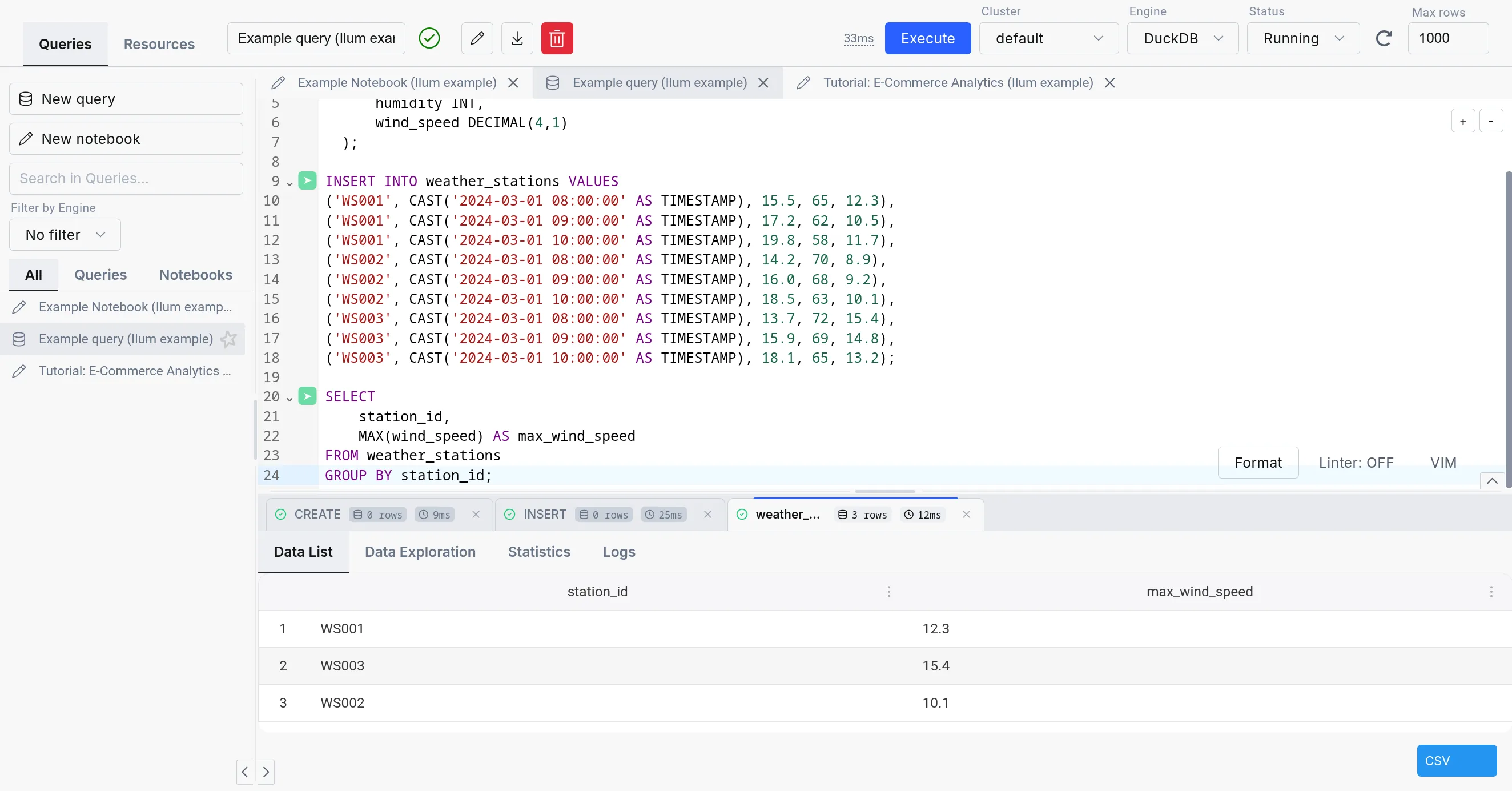
The SQL Editor consists of three parts:
-
SQL query editor: The center part of the SQL Editor, which allows you to write and execute SQL queries. It comes with a simple text editor in the query mode and a notebook-like interface in the notebook mode.
-
The sidebar: Contains your different SQL queries and notebooks in the "Queries" tab, the engine list and lifecycle controls in the "Engines" tab, and a mini version of the Explorateur de tables in the "Resources" tab.
-
The output: Appears in the bottom part of the screen when you execute a query. It has tabs for Data, Logs, Statistics, Plan, Export, and Visualization, plus column-level profiling.
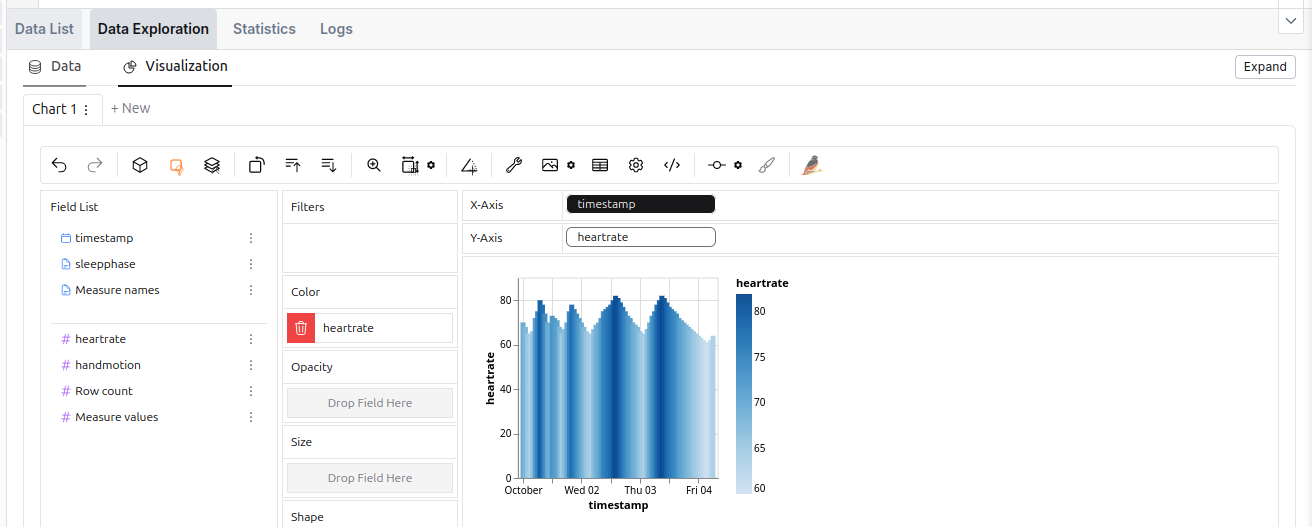 The data exploration tool in the SQL Editor.
Moteurs alternatifs
The SQL Editor supports four engines: Apache Spark, Trinitaire, DuckDBet Apache Flink. For an in-depth comparison, refer to the Execution Engines overview.
| Spark SQL | Trinitaire | DuckDB | |
|---|---|---|---|
| Déploiement | On cluster and dynamic | On cluster | Embedded |
| Use Case | ETL, Big data processing | Interactive analytics | Interactive analytics, medium-data ETL, prototyping |
| Storage Support | Comprehensive (with additional JARs) | Sufficient | Lacking (but quickly expanding) |
| Concurrency | High (with tuning) | Very high | Limited |
| Performance | Good for large datasets (with tuning) | Good | Good |
| Overhead | Very high | Medium (always-on coordinator) | Very low (in-process) |
| Lineage support | Extensive | Existing (harder to configure) | With custom extension (supported in Ilum) |
| Extensibility | Easy (big extension ecosystem) | Moderate (smaller extension ecosystem) | Limited (smaller extension catalog, C++ based) |
While using the Spark SQL engine will ensure compatibility with most Ilum components, we recommend checking out the other options since they offer a much better ad-hoc query experience than Spark SQL.
When changing an engine, your tables might be accessible differently or not be available at all due to the differences in the underlying storage.
| Metastore | Spark SQL | Trinitaire | DuckDB |
|---|---|---|---|
| Ruche Metastore | ✅ | ✅ | 🟨 (subset of functionalities supported with extension) |
| Nessie | ✅ | ✅ | 🟨 (possible, but unergonomic) |
| DuckLake | ❌ | ❌ | ✅ |
| Format | Spark SQL | Trinitaire | DuckDB |
|---|---|---|---|
| Delta Table | 🟨 (extension) | ✅ | 🟨 (Lecture seule) |
| Iceberg | 🟨 (extension) | ✅ | 🟨 (with caveats) |
| Hudi | 🟨 (extension) | ✅ | ❌ |
| Parquet | ✅ | ✅ | ✅ |
| Avro | 🟨 (extension) | 🟨 (not direct) | ✅ |
| ORC | ✅ | ✅ | ❌ |
| PostgreSQL | 🟨 (JDBC) | ✅ | ✅ |
| DuckDB format | ❌ | ✅ | ✅ |
Trinitaire
Trino est un moteur de requête SQL distribué hautes performances conçu pour l’analyse du Big Data. Il offre une alternative convaincante à Spark SQL, en particulier pour les Charges de travail ad hoc où la vitesse d’exécution des requêtes et la faible latence sont des priorités. Pour plus de détails sur la configuration, consultez la section Documentation Trino.
Le compromis est que les moteurs Spark SQL sont lancés à la demande, tandis que Trino doit fonctionner en permanence en arrière-plan, ce qui consomme des ressources de cluster.
Trino intégré n’est pas activé par défaut. Pour le configurer, vous devez Configurez-le dans vos valeurs de casque.
Connexion du Trino intégré au Metastore Hive
Bien que Trino puisse fonctionner de manière indépendante, sa connexion au Hive Metastore d’Ilum offre un accès transparent aux mêmes données que celles disponibles dans Spark. Cette intégration nécessite la création d’un catalogue dédié dans Trino qui référence le Metastore Hive, utilise le stockage S3 et prend en charge une grande variété de formats, tout comme Spark.
Par défaut, Trino dans Ilum est livré avec un ilum-delta , qui est configuré avec une connexion Hive Metastore par défaut,
stockage S3 par défaut et prise en charge de Delta Lake.
Pour ce faire, il a été procédé en définissant la configuration suivante dans le fichier valeurs.yaml fichier de la carte de barre principale d’Ilum :
ilum-sql:
  Configuration:
    Trino:
      Activé: vrai
      catalogue: ilum-delta

Trino:
  Activé: vrai
  Catalogues:
    ilum-delta: | # Nom du catalogue créé
      connector.name=delta_lake # Nom du connecteur (Delta Lake cette fois-ci)
      delta.metastore.store-table-metadata=true # Fait en sorte que Trino stocke les métadonnées dans le Metastore Hive
      delta.register-table-procedure.enabled=vrai # Permet la procédure d’enregistrement des tables dans Trino
      hive.metastore.uri=friperie://ilum-ruche-metastore:9083 # URI Hive Metastore
      fs.native-s3.enabled=vrai # Activation de la prise en charge de S3
      s3.endpoint=http://ilum-minio:9000 # Point de terminaison S3
      s3.region=nous-Est-1 # Région S3
      s3.chemin-style-access=true # Accès de style chemin S3
      s3.aws-accès-clé=minioadmin # Clé d’accès S3
      s3.aws-secret-clé=minioadmin # Clé secrète S3
Ces valeurs ne reflètent que la configuration par défaut. Si vous avez une configuration différente, vous devez ajuster les valeurs en conséquence.
Instance Trino externe
Il est également possible de connecter votre propre instance Trino en fournissant les valeurs helm suivantes :
ilum-sql.config.trino.enabled=vrai
# Une URL pointant vers un coordinateur Trino
ilum-sql.config.trino.url=http://ilum-trino:8080
# Un nom du catalogue de base que vous souhaitez utiliser
ilum-sql.config.trino.catalog=système
DuckDB
DuckDB in Ilum provides low-latency SQL queries without the overhead of spinning up Spark clusters. It’s embedded directly in the backend service, making it ideal for interactive exploration, medium-data ETL, and rapid prototyping.
For detailed DuckDB reference, see the official DuckDB documentation.
As DuckDB is an embedded database, it does not use resources if unused, so it is always available inside Ilum.
DuckDB vs. DuckLake
DuckDB is the SQL engine. DuckLake is the storage layer and catalog that provides:
- Multi-user concurrent access to the same tables
- Persistent table metadata across sessions
- Time travel and schema evolution
- Cross-table transaction support
In Ilum, DuckDB uses DuckLake by default for tables created in the SQL Editor. This means CREATE TABLE statements
produce persistent, queryable tables accessible to all users and jobs.
You can also read Parquet files directly without creating tables:
CHOISIR * DE 's3://bucket/data/*.parquet';
Use direct Parquet reads for one-off queries. Use DuckLake tables for repeated access and multi-user workflows.
For DuckLake configuration and features, see the DuckLake documentation.
Configuration
DuckDB has minimal configuration in Ilum. The primary setting controls connection lifecycle:
ilum-core:
  SQL:
    duckdb:
      idleTimeout: 1h    # Time after which idle DuckDB instances are closed
                         # Reduces memory footprint for infrequent use
No additional settings are required. DuckDB extensions, DuckLake attachment, and catalog integration are configured automatically from your cluster and Helm values.
Resource Considerations
DuckDB shares CPU and memory with the Ilum backend service. For interactive queries it may be fine for some time, but the amount of memory will amass over time. For long-running or larger workloads consider:
- Increase backend resources via
ilum-core.resources.limits.memoryetilum-core.resources.limits.cpu - Consider moving ETL workloads to separate pods via Apache Airflow or dedicated DuckDB services
DuckDB Extensions
DuckDB supports a number of extensions, which can add additional functionality to your pipelines.
In general, they can be installed either from the noyau repository,which is included in the default installation, the community repository,
which requires downloading the extension binary file every time you install the extension, or from a custom repository.
For now, Ilum provides two extensions for DuckDB in the custom repository:
hive_metastore- allows you to connect to the Hive Metastore from DuckDBopenlineage- allows you to track the execution of your pipelines using OpenLineage
The extensions are automatically configured with the settings from the helm values and the cluster, so you do not need to do anything else.
We plan to open-source both of these extensions in the future, when we are sure that they are ready for public use.
Conseils et bonnes pratiques
Utilisation de clients SQL externes avec JDBC
While SQL Editor works purely in the browser, you can also connect your Ilum SQL to external environments that support Hive / Spark JDBC drivers. This way, you can run queries on your Ilum data from your favorite SQL client or BI tool.
Pour ce faire, configurez une connexion JDBC avec la chaîne de connexion suivante :
jdbc :hive2 ://<ilum-sql-host> :<thrift-binary-port>/<database-name> ;? spark.ilum.sql.cluster.id=<cluster-id>
Où:
<ilum-sql-host>est le nom d’hôte de votre composant de service SQL Ilum (par exemple,ilum-sql-headlessouilum-sql-trift-binary)<thrift-binary-port>est le port sur lequel le service Thrift est exposé (la valeur par défaut est10009)<database-name>est le nom de la base de données à laquelle vous souhaitez vous connecter (mettezfaire défautlà)<cluster-id>est l’ID du cluster Spark auquel vous souhaitez vous connecter (vous pouvez le trouver dans l’interface utilisateur Ilum)
Using ODBC drivers for external tools
For tools that require ODBC connectivity (such as Excel, Power BI, or legacy reporting systems), connect to ilum using the Simba Spark ODBC Driver.
-
Download the driver from the Simba Spark ODBC Driver page (available for Windows, macOS, and Linux).
-
Configure a DSN (Data Source Name) with these parameters:
Parameter Valeur Host <ilum-sql-host>or LoadBalancer IPPort 10009Authentification Username/Password (ilum credentials) or No Authentication Thrift Transport Binary SSL Enable for production environments -
Connect from your application using the configured DSN. Most tools provide an ODBC data source selector in their connection dialogs.
JDBC is generally preferred for programmatic access and tools that support it natively. Use ODBC when the client tool does not support JDBC or when connecting from Windows-based applications that rely on the Windows ODBC driver manager.
Using the SQL Editor on datasets from other Ilum’s components
SQL Editor creates tables in the Ruche Metastore par défaut, ce qui signifie que toutes les ressources Spark, qui utilisent également le même metastore, pourra voir ces tables.
Une tâche qui utilise un metastore a normalement la configuration suivante :
spark.sql.catalogMise en œuvre=ruche
spark.hadoop.hive.metastore.uris=thrift:// <hive-metastore-host>:<hive-metastore-port>
# Emplacement de stockage du metastore (par exemple, s3)
spark.hadoop.fs.s3a.access.key=<access-key>
spark.hadoop.fs.s3a.secret.key=<secret-key>
spark.hadoop.fs.s3a.endpoint=<s3-endpoint>
spark.hadoop.fs.s3a.path.style.access=vrai
spark.hadoop.fs.s3a.fast.upload=vrai
Nous pouvons voir que l’uri du metastore est fourni et qu’un emplacement de stockage partagé est utilisé.
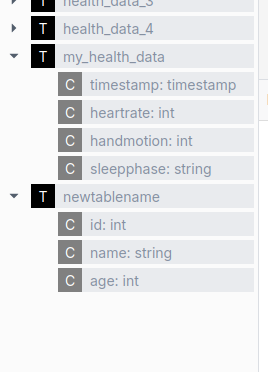 Un exemple de composant qui utilise également le metastore est le paramètre Ilum Table Explorer.
Utiliser les éléments d’optimisation de Spark
Spark SQL offre plusieurs fonctionnalités d’optimisation qui peuvent améliorer considérablement les performances de vos requêtes grâce au partitionnement, clustering et les formats de stockage appropriés. Ces techniques d’optimisation permettent à Spark de traiter les requêtes plus efficacement, en particulier lorsqu’il s’agit de jeux de données volumineux. en minimisant la quantité de données à analyser et en améliorant l’organisation des données sur disque.
L’exemple suivant montre une définition de table qui intègre plusieurs techniques d’optimisation :
- Partitionnement de la table par le
dateetpayscolonnes, ce qui permet à Spark d’ignorer les partitions non pertinentes - Regroupement des données par
ID d’utilisateurPour améliorer la localité des données pour les lignes associées - Tri des données par
viewTimepour des requêtes de plage plus efficaces - Organisation des données en compartiments pour une meilleure distribution
- À l’aide de l’icône
PARQUETqui est optimisé pour le stockage en colonnes et l’interrogation efficace
CRÉER TABLE page_view
(
    viewTime     INT,
    ID d’utilisateur       LE BIGINT,
    page_url CORDE,
    referrer_url CORDE,
    amis ARRAY<LE BIGINT>,
    propriétés CARTE<CORDE, CORDE>,
    CHAÎNE dt,
    STRING de pays
) COMMENTAIRE 'Ceci est le tableau des pages vues'
PARTITIONNÉ PAR(Dt, pays)
CLUSTER PAR(ID d’utilisateur) TRIÉ PAR(viewTime) DANS 32 SEAUX
EMMAGASINÉ COMME PARQUET
Un effet similaire peut être obtenu en utilisant les fonctionnalités fournies par d’autres formats de tableaux, qui sont Discuté sous
Utilisez les extensions Spark SQL pour augmenter les performances de vos requêtes
Spark SQL vous permet d’utiliser diverses extensions SQL pour améliorer les fonctionnalités SQL intégrées.
Cela se fait via le spark.sql.extensions propriété.
Par exemple, vous pouvez ajouter l’icône Lac Delta , qui fournit des fonctionnalités supplémentaires pour l’utilisation des tables Delta.
Cependant, cette propriété peut également être utilisée pour activer d’autres extensions, telle qu’une extension d’optimisation SQL pour les moteurs d’exécution Spark. Pour l’activer, procédez comme suit :
- Utiliser l’une des images Ilum Spark les plus récentes
- Ajoutez le fichier JAR de l’extension à partir du référentiel Maven :
org.apache.kyuubi :kyuubi-extension-spark-<SPARK_VERSION>_<SCALA_VERSION> :<KYUUBI_VERSION> - Modifiez l’image conteneur de votre Spark et ajoutez le fichier JAR au classpath
Cela vous permettra d’ajouter l’extension à votre moteur SQL comme suit : spark.sql.extensions=org.apache.kyuubi.sql.KyuubiSparkSQLExtension.
Cette propriété est une liste d’extensions séparées par des virgules, vous pouvez donc en ajouter plusieurs.
Enregistrer des requêtes, importer et exporter des requêtes SQL
The SQL Editor allows you to save your queries for later use, as well as import and export them.
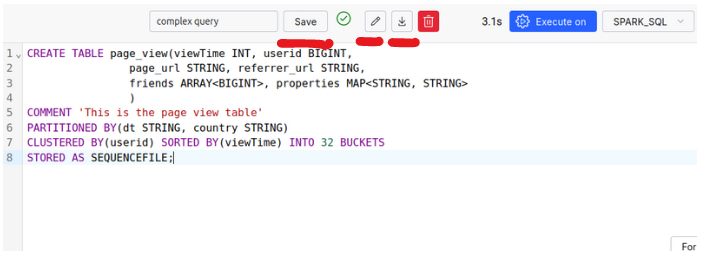
Make use of More Advanced Data Formats: Apache Iceberg, Apache Hudi, and Delta Tables
Delta Tables
Delta Lake est une couche de stockage open source qui apporte des transactions ACID à Apache Spark et Charges de travail Big Data. Il utilise Delta Tables comme format de base, combinant Limes parquet avec Journaux de transactions. Ces journaux assurent le suivi des versions de table, capturent les opérations DML et gérer la concurrence avec des verrous.
En termes simples, chaque opération sur une partition crée une nouvelle version, en préservant la précédente pour Restauration facile si nécessaire. Un fichier journal de transactions aide ces versions à gérer le verrouillage et la version. contrôle, en assurant la cohérence des données.
Delta Lake est simple à utiliser et constitue un excellent choix pour l’intégration de fonctionnalités supplémentaires à votre environnement Ilum.
Pour plus de détails sur la gestion de la simultanéité de Delta Lake avec OCC (contrôle optimiste de la concurrence), et comment il intègre le streaming et les écritures par lots, nous vous recommandons de visiter la Documentation du lac Delta.
Fonctionnalités:
- Entretien des propriétés de l’ACID
- Prise en charge des opérations de mise à jour, de suppression et de fusion
- Evolution du schéma : modification des tables
- versioning : possibilité de Voyage dans le temps vers les versions précédentes de l’ensemble de données
- meilleure optimisation par rapport aux formats traditionnels
- Intégration de ces fonctionnalités pour le streaming et les lots
Comment utiliser les tables Delta ?
By default, Delta Tables are enabled inside Ilum’s SQL Editor. The following configurations are set for you:
spark.sql.extensions=io.delta.sql.DeltaSparkSessionExtension
spark.sql.catalog.spark_catalog=org.apache.spark.sql.delta.catalog.DeltaCatalog
spark.databricks.delta.catalog.update.enabled=vrai
Therefore, you can make use of Delta Tables inside your SQL Editor without any extra steps.
-
Créer une table delta
CRÉER TABLE my_health_data_delta
(
    horodatage  HORODATAGE,
    fréquence cardiaque  INT,
    mouvement de la main INT,
    phase de sommeil VARCHAR(20)
) UTILISANT DELTA; -
Exécuter des opérations DML
INSÉRER DANS my_health_data_delta (horodatage, fréquence cardiaque, mouvement de la main, phase de sommeil) VALEURS
(JETER('2024-10-01 00:00:00' COMME HORODATAGE), 70, 1, « Réveillé »),
(JETER('2024-10-01 01:00:00' COMME HORODATAGE), 68, 0, « Lumière »),
(JETER('2024-10-01 02:00:00' COMME HORODATAGE), 65, 0, « Profond »),
(JETER('2024-10-01 03:00:00' COMME HORODATAGE), 64, 1, « Profond »),
(JETER('2024-10-01 04:00:00' COMME HORODATAGE), 66, 0, « Lumière »);
SUPPRIMER DE my_health_data_delta
OÙ horodatage = '2024-10-01 02:00:00';METTRE À JOUR my_health_data_delta
POSER fréquence cardiaque = 50
OÙ horodatage = '2024-10-01 03:00:00'; -
Voir l’historique et les détails des versions
DÉCRIRE HISTOIRE my_health_data_delta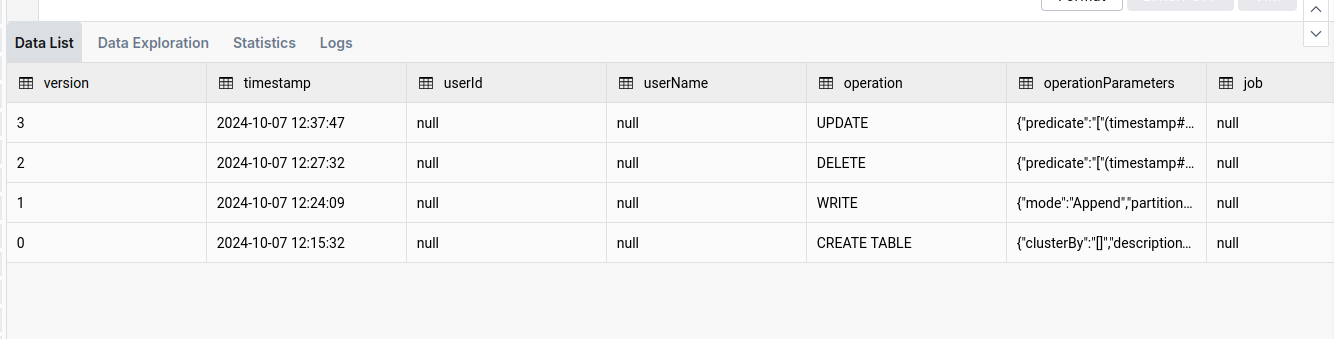
-
Utiliser la fonctionnalité de voyage dans le temps et la version
CHOISIR *
DE my_health_data_delta VERSION COMME DE 1
Ou pour voyager à une date précise (par exemple, un jour de retour) :
CHOISIR *
DE my_health_data_delta HORODATAGE COMME DE date_sub(current_date(), 1) -
Assainissement
Bien que les tables delta soient optimisées pour les performances, elles peuvent s’accumuler un grand nombre de fichiers au fil du temps. Le
VIDEoperation permet de nettoyer ces fichiers et d’optimiser la table. Vous pouvez lire à ce sujet ici.ASPIRATEUR my_health_data_deltaOu pour voir quels fichiers seront supprimés (jusqu’à 1000) :
FONCTIONNEMENT SOUS VIDE my_health_data_delta À SEC
Apache Hudi
Bien qu’Apache Hudi soit similaire au lac Delta, il a ses avantages uniques. Dans Apache Hudi, chaque partition est organisée en Groupes de fichiers. Chaque groupe de fichiers se compose de Tranches, qui contiennent des fichiers de données et les fichiers journaux qui les accompagnent. Les fichiers journaux enregistrent les actions et les données affectées, ce qui permet à Hudi d’optimiser les opérations de lecture en Application de ces actions au fichier de base pour produire la dernière vue des données.
Pour simplifier le processus, il suffit de configurer Compactage opérations est essentielle. Le compactage crée une nouvelle tranche avec un fichier de base mis à jour, ce qui améliore les performances.
Cette structure, ainsi que l’optimisation étendue de Hudi, améliorent l’efficacité de l’écriture, ce qui en fait Plus rapide que les formats alternatifs dans certains scénarios. De plus, Hudi soutient NBCC (Contrôle d’accès concurrentiel non bloquant) Au lieu de OCC (Optimistic Concurrency Control), qui est plus efficace dans les environnements avec Écritures simultanées élevées.
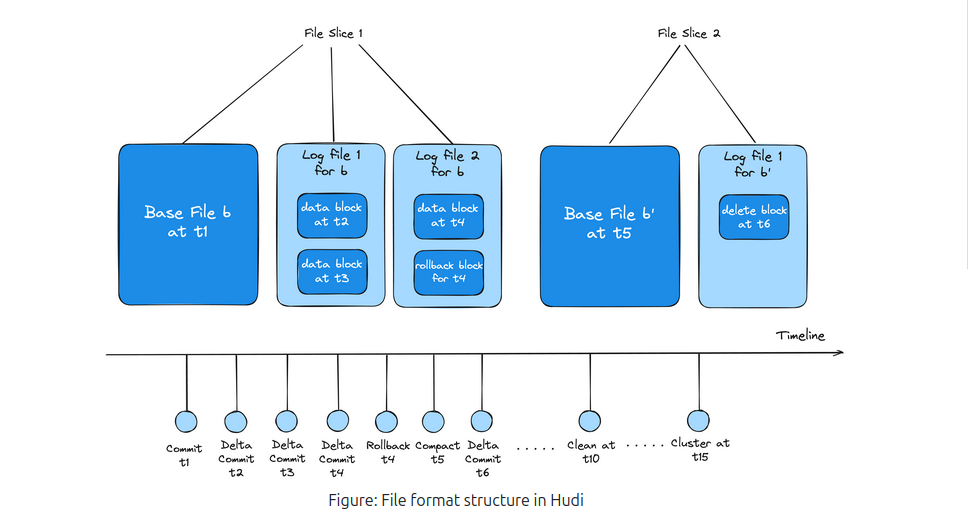
En résumé, Apache Hudi est bien adapté aux environnements avec des opérations d’écriture simultanées lourdes et offre plus de contrôle sur les optimisations personnalisées, bien qu’il puisse être moins convivial que Delta Lake.
Pour en savoir plus, vous devriez visiter Apache Hudi Documentation Page
Comment utiliser Apache Hudi ?
Contrairement à Delta Lake, l’Apache Hudi n’est pas préconfiguré ; Par conséquent, vous devrez modifier la configuration du cluster et ajouter les propriétés suivantes :
{
  « spark.jars.packages »: « org.apache.hudi :hudi-spark3.5-bundle_2.12:0.15.0 »,
  « spark.serializer »: « org.apache.spark.serializer.KryoSerializer »,
  « spark.sql.catalog.catalog_spark_catalog »: « org.apache.spark.sql.hudi.catalog.Catalogue de sweats à capuche »,
  « spark.sql.extensions »: « org.apache.spark.sql.hudi.HoodieSparkSessionExtension »,
  « spark.kryo.registrator »: « org.apache.spark.HoodieSparkKryoRegistrar »
}
Remember to make sure that the version of the Hudi-spark’s jar is matching the version of the Spark you are using.
De plus, comme le paquet jar n’est pas préinstallé, vous pouvez rencontrer le problème de la mémoire insuffisante de la JVM lors de l’initialisation du moteur. Pour en savoir plus sur ce problème et sur la façon de le résoudre, veuillez vous référer à la section Section de dépannage.
-
Créer une table Hudi
CRÉER TABLE my_sales_data_hudi (
    sale_id CHAÎNE,
    sale_date HORODATAGE,
    product_id CORDE,
    quantité INT,
    prix DÉCIMAL(10, 2)
) UTILISANT HUDI
TBLPROPERTIES (
    type = 'Mor',
    primaryKey = 'sale_id'
);
Remarquez le
type = 'mor'propriété, qui signifie Fusionner en lecture. Cette propriété modifie le type de la table, ce qui équilibre l’optimisation entre la lecture et l’écriture Opérations. -
Effectuer des opérations DML
INSÉRER DANS my_sales_data_hudi (sale_id, sale_date, product_id, quantité, prix) VALEURS
('S001', JETER('2024-10-01 10:00:00' COMME HORODATAGE), 'P001', 10, 99.99),
('S002', JETER('2024-10-01 11:00:00' COMME HORODATAGE), 'P002', 5, 49.99),
('S003', JETER('2024-10-01 12:00:00' COMME HORODATAGE), 'P003', 20, 19.99),
('S004', JETER('2024-10-01 13:00:00' COMME HORODATAGE), 'P004', 15, 29.99),
('S005', JETER('2024-10-01 14:00:00' COMME HORODATAGE), 'P005', 8, 39.99);
METTRE À JOUR my_sales_data_hudi
POSER prix = 89.99
OÙ sale_id = 'S001';SUPPRIMER DE my_sales_data_hudi
OÙ sale_id = 'S003'; -
Lister les commits
APPELER show_commits (table => « my_sales_data_hudi », limite => 5)
Remarquez ici le
commit_time, qui indique l’heure du commit. Nous pouvons utiliser cette valeur pour effectuer un voyage dans le temps. -
Utiliser la fonctionnalité de voyage dans le temps
APPELER rollback_to_instant(table => « my_sales_data_hudi », instant_time => <commit-time-from-last-step>'');Cette commande rétablira la table dans l’état où elle se trouvait au moment de la validation spécifiée. Gardez à l’esprit que vous ne pouvez annuler que le dernier commit, donc si vous voulez revenir plus loin, Vous devez effectuer plusieurs restaurations.
Apache Iceberg
Apache Iceberg est un format de table haute performance spécialement conçu pour les lacs de données, offrant des capacités uniques par rapport à d’autres formats. Construit autour d’une architecture distincte, Iceberg utilise Snapshots pour gérer les états des tables, Éviter de s’appuyer sur les journaux de transactions traditionnels. Cette conception basée sur des instantanés capture l’état entier d’une table à des moments spécifiques.
Chaque instantané contient un Liste des manifestes, qui à son tour fait référence à plusieurs manifestes. Ces manifestes organisent des pointeurs vers des fichiers de données spécifiques et contiennent des métadonnées pertinentes, ce qui permet à Iceberg de suivre efficacement les modifications sans dupliquer les fichiers de données entre les instantanés. Cette approche optimise le stockage, car les instantanés peuvent réutiliser des fichiers de données existants, réduisant ainsi la redondance.
Iceberg offre également des fonctionnalités puissantes telles que Branchement et balisage, permettant aux utilisateurs de créer des branches de tables et d’attribuer des balises lisibles par l’homme aux instantanés. Ces fonctionnalités sont essentielles pour le contrôle de version, Permettre aux équipes de gérer les mises à jour simultanées et de tester les modifications avant de les mettre en production.
Grâce à des options d’organisation des données flexibles et à des capacités de gestion des versions robustes, Apache Iceberg permet une gestion des données évolutive et performante pour les lacs de données modernes.
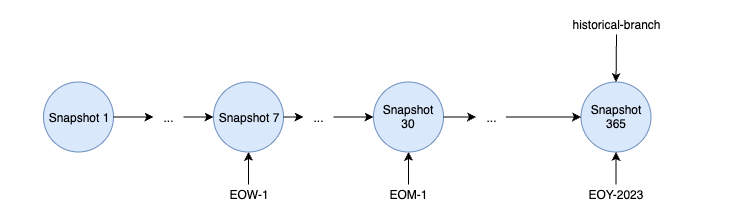
En savoir plus sur la documentation d’Apache Iceberg
Comment utiliser Apache Iceberg ?
Contrairement à Delta Lake, l’Apache Hudi n’est pas préconfiguré ; Par conséquent, vous devrez modifier la configuration du cluster et ajouter les propriétés suivantes :
{
  « spark.jars.packages »: « org.apache.iceberg :iceberg-spark-runtime-3.5_2.12:1.6.1 »,
  « spark.sql.extensions »: « org.apache.iceberg.spark.extensions.IcebergSparkSessionExtensions »,
  « spark.sql.catalog.catalog_spark_catalog »: « org.apache.iceberg.spark.SparkSessionCatalog »,
  « spark.sql.catalog.spark_catalog.type »: « Ruche »,
  « spark.sql.catalog.spark_catalog.uri »: « thrift://ilum-hive-metastore:9083 »
}
Remember to make sure that the version of the Iceberg’s jar is matching the version of the Spark you are using and that the Hive Metastore is available at the specified URI.
De plus, comme le paquet jar n’est pas préinstallé, vous pouvez rencontrer le problème de la mémoire insuffisante de la JVM lors de l’initialisation du moteur. Pour en savoir plus sur ce problème et sur la façon de le résoudre, veuillez vous référer à la section Section de dépannage.
-
Créez une table iceberg :
CRÉER TABLE weather_stations
(
    station_id CORDE,
    reading_time HORODATAGE,
    température DÉCIMAL(4,1),
    humidité INT,
    wind_speed DÉCIMAL(4,1)
) UTILISANT iceberg -
Insérer des données dans le tableau
INSÉRER DANS weather_stations VALEURS
('WS001', JETER('2024-03-01 08:00:00' COMME HORODATAGE), 15.5, 65, 12.3),
('WS001', JETER('2024-03-01 09:00:00' COMME HORODATAGE), 17.2, 62, 10.5),
('WS001', JETER('2024-03-01 10:00:00' COMME HORODATAGE), 19.8, 58, 11.7),
('WS002', JETER('2024-03-01 08:00:00' COMME HORODATAGE), 14.2, 70, 8.9),
('WS002', JETER('2024-03-01 09:00:00' COMME HORODATAGE), 16.0, 68, 9.2),
('WS002', JETER('2024-03-01 10:00:00' COMME HORODATAGE), 18.5, 63, 10.1),
('WS003', JETER('2024-03-01 08:00:00' COMME HORODATAGE), 13.7, 72, 15.4),
('WS003', JETER('2024-03-01 09:00:00' COMME HORODATAGE), 15.9, 69, 14.8),
('WS003', JETER('2024-03-01 10:00:00' COMME HORODATAGE), 18.1, 65, 13.2); -
Créer une balise à partir de l’instantané actuel
CHANGER TABLE weather_stations CRÉER ÉTIQUETTE `initial_state` -
Apporter quelques modifications aux données
METTRE À JOUR weather_stations
POSER
  température = 16.5
OÙ
  station_id = 'WS001'
  ET reading_time = JETER('2024-03-01 08:00:00' COMME HORODATAGE)
SUPPRIMER DE weather_stations OÙ station_id = 'WS002' -
Répertorier tous les instantanés
CHOISIR * DE spark_catalog.faire défaut.weather_stations.Snapshots
Enregistrez l’horodatage (
commited_at) de l’instantané auquel vous souhaitez voyager dans le temps pour plus tard. -
Obtenez l’historique
CHOISIR * DE spark_catalog.faire défaut.weather_stations.histoire -
Revenir à une balise spécifique
APPELER spark_catalog.système.set_current_snapshot (
  table => 'spark_catalog.default.weather_stations',
  ref => 'initial_state'
) -
Voyage dans le temps vers un instantané spécifique
CHOISIR * DE weather_stations HORODATAGE COMME DE <horodatage-De-pas-5>
How to use UDFs in the SQL Editor?
UDFs (User Defined Functions) are a powerful feature in SQL that allows you to define custom functions to use in your queries. They are also supported in the SQL Editor, allowing you to extend the functionality of your queries.
-
Créer une classe pour votre FDU
colis example

importation org.apache.hadoop.ruche.ql.exec.UDF

classe ScalaUDF extends UDF {
  Def evaluate(str: String): Int = {
    str.length()
  }
}
Assurez-vous d’inclure la dépendance nécessaire de
hive-exec :3.1.3Dans votre projet :<dépendance>
<groupId>org.apache.ruche</groupId>
<artefactId>hive-exec</artefactId>
<Version>3.1.3</Version>
</dépendance> -
Créez un paquet jar et placez-le dans votre stockage distribué

Assurez-vous de mémoriser le chemin d’accès à votre fichier jar.
-
Add it to the SQL Editor spark session
AJOUTER JARRE <the-path-to-your-jar-file>'' -
Créez une fonction liée à la fonction udf que vous avez définie
CRÉER
OU REMPLACER FONCTION ScalaUDF comme 'exemple. ScalaUDF' -
Utilisez-le dans une requête
CHOISIR nom, ScalaUDF(nom)
DE newtablename
Dépannage
It is useful to know that when executing SQL queries from the SQL Editor page, the SQL execution engines are visible as normal Ilum Jobs. This means that you can monitor their state, check logs and statistics, just like any other job in the "Jobs" tab.
Tas JVM en mémoire insuffisante lors de l’envoi d’étincelles
Si dans les journaux de lancement du moteur, vous trouvez une erreur comme celle-ci :
Exception dans le thread « main » io.fabric8.kubernetes.client.KubernetesClientException : espace de tas Java
    à io.fabric8.kubernetes.client.dsl.internal.OperationSupport.waitForResult (OperationSupport.java :520)
    à l’adresse io.fabric8.kubernetes.client.dsl.internal. OperationSupport.handleResponse(OperationSupport.java :535)
    ...
    à l’adresse org.apache.spark.deploy.SparkSubmit$.main(SparkSubmit.scala :1129)
    à org.apache.spark.deploy.SparkSubmit.main(SparkSubmit.scala)
Causé par : java.lang.OutOfMemoryError : espace de tas Java
    ...
Cela est probablement dû au fait que la taille de tas JVM par défaut de l’envoi d’étincelle interne d’Ilum est trop petite pour votre tâche.
Pour résoudre ce problème, vous pouvez passer à l’option Envoi d’une étincelle externe. De cette façon, le processus de soumission Spark ne sera pas limité aux ressources du pod d’Ilum.